Rancher
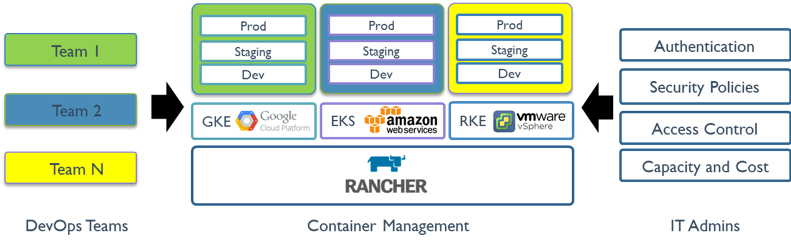
Rancher is a container management platform built for organizations that deploy containers in production. Rancher makes it easy to run Kubernetes everywhere, meet IT requirements, and empower DevOps teams.
Presentation
ranchermanager.docs.rancher.com
Content
- Applications
- Architecture
- Authentication
- Automation
- Extensions
- Getting started
- Installation
- Migrations
- Operations
- Provisioning
- Training
Releases
| Version | Date | Links |
|---|---|---|
| 2.7.5 | 2023-07-31 | Annoucement |
| 2.7.0 | 2022-11-16 | Annoucement |
| 2.6.0 | 2021-08-31 | Annoucement |
Goodies
- Rancher Best Practices
- Rancher Brand Guidelines & Resources
- Rancher Forums
- Rancher UI DevKit
- Support Matrix for Rancher
- Non-official: Rancher Barn (recipes)
Alternatives
Quick start
- Get Started with SUSE Rancher in 2 Easy Steps (see also Installing Rancher on a Single Node Using Docker)
# creates Rancher container
sudo docker run --privileged -d --restart=unless-stopped -p 80:80 -p 443:443 rancher/rancher

# manual: open http://localhost and follow instructions to login, at the end download the kubeconfig file

# sets kubectl to the Kubernetes cluster and displays the single node
export KUBECONFIG=local.yaml
kubectl get nodes
Operations
Learning
Tips
Q. Is it possible to change the rancher/shell to another image?
A. Yes, it’s a setting in global settings. It can also be set with the environment variable on rancher CATTLE_SHELL_IMAGE=my/customshell:tag